



Update how to write Swift code
Introduction
Swift 5.9 was released.
Macros
Both the implementation and AST usage are quite tricky 😣
Observation
With iOS 17.0+, using it in production is a bit… 😓
For those of us in this situation, here are some Swift coding techniques made possible by updates over the past 1–2 years, including Swift 5.9, that you can start using right away.
These are things I personally use often or expect will be commonly used.
If you’re using Swift 5.9 (Xcode 15.0) or later, you can use them without worrying about the Deployment Target.
I’ve focused on such features in this summary.
Optional Binding
if let hoge = hoge
Thanks to the introduction of shorthand syntax for if let, it’s now easier to unwrap a variable using the same name.
🙁 Up until now:
let hoge: Hoge? = ...
if let hoge = hoge {
  // unwrap された `hoge` を利用可能
}
🙂 From now on
let hoge: Hoge? = ...
if let hoge {
  // unwrap された `hoge` を利用可能
}

// 複数個も対応
let fuga: Fuga? = ...
if let hoge, let fuga {
  // unwrap された `hoge`, `fuga` を利用可能
}
It has now become available.
The supported version and related proposal are as follows:
Swift 5.7 (Xcode 14.0) and later
SE-0345: if let shorthand for shadowing an existing optional variable
guard let self = self else { return } ...
This is a pattern many of us tend to write out of habit, but now it can be written much more concisely step by step.
🙁 Up until now:
hoge.callback = { [weak self] in
  guard let `self` = self else { return }

  self.fuga()
}
🙂 From now on
hoge.callback = { [weak self] in
  guard let self else { return }  // shorthand 記法

  fuga()  // `self.` を省略可能
}
A long time ago, there were even discussions that guard let self = self might be a bug, but through multiple proposals, it has now evolved into the sleek, Swifty code shown above.
The related proposals include:
Making guard let self = self officially acceptable
Swift 4.2 (Xcode 10.0) and later
- SE-0079: Allow using optional binding to upgrade
selffrom a weak to strong reference
Introduction of shorthand syntax for guard let self (as covered in the previous section)
Swift 5.7 (Xcode 14.0) and later
- SE-0345:
if letshorthand for shadowing an existing optional variable
Omitting self. becomes possible
Swift 5.8 (Xcode 14.3) and later
- SE-0365: Allow implicit
selfforweak selfcaptures, afterselfis unwrapped
With Swift 5.8, this set of improvements has essentially reached completion.
if Expressions / switch Expressions
While there are some limitations, if and switch can now be used as expressions.
What’s great about this is that it allows for the following kinds of code:
🙁 Up until now:
func hoge(type: MetaType) {
  let evaluation: String

  switch type {
    case .hoge:
      evaluation = "good!"
    case .fuga:
      evaluation = "not bad."
    case .piyo:
      evaluation = "very bad..."
  }
  ...
}
🙂 From now on
func hoge(type: MetaType) {
  let evaluation: String = switch type {
    case .hoge:
      "good!"
    case .fuga:
      "not bad."
    case .piyo:
      "very bad..."
  }
  ...
}
Until now, the compiler already performed exhaustiveness checks during variable initialization and threw an error when needed. However, it’s now possible to write those expressions in a more intuitive way.
Also, one of the motivations mentioned in the proposal is that it’s now possible to lift out return—a common suggestion in Kotlin/Android Studio.
🙁 Up until now:
func hoge(type: MetaType) -> String {
  if type == .hoge {
    return "hoge"
  } else if type == .fuga {
    return "fuga"
  } else {
    return "unknown"
  }
}
🙂 From now on
func hoge(type: MetaType) -> String {
  return if type == .hoge {
    "hoge"
  } else if type == .fuga {
    "fuga"
  } else {
    "unknown"
  }
}
Important Note:
Each branch of the if, or each case of the switch, must be a single expression.
Because of this, it’s difficult to use these expressions for complex multi-line logic or when you want to add an extra line for something like logging. This differs from how if/switch expressions work in some other languages.
Supported version and related proposal:
Swift 5.9 (Xcode 15.0) and later
- SE-0380:
ifandswitchexpressions
extension Array where Element = ... { }
When working with models represented as arrays, it’s common to define convenient methods via extension Array or extension Sequence.
Previously, using where Element == ... led to somewhat verbose code. But now, a more intuitive syntax is available for this use case as well.
🙁 Up until now:
extension Array where Element == Hoge {
  func fuga() -> String {
    ...
  }
}
🙂 From now on
extension Array<Hoge> {
  func fuga() -> String {
    ...
  }
}
Supported version and related proposals:
Swift 5.7 (Xcode 14.0) and later
- SE-0346: Lightweight same-type requirements for primary associated types
- SE-0361: Extensions on bound generic types
Number of Views in a ViewBuilder
A common hurdle for SwiftUI beginners—the limitation of not being able to place more than 10 views inside a ViewBuilder—has finally been resolved.
🙁 Up until now:
var body: some View {
  VStack {
    Text("01")
    Text("02")
    Text("02")
    Text("04")
    Text("05")
    Text("06")
    Text("07")
    Text("08")
    Text("09")
    Group {  // `Group` でラップするワークアラウンド
      Text("10")
      Text("11")
    }
  }
}
🙂 From now on
var body: some View {
  VStack {
    Text("01")
    Text("02")
    Text("02")
    Text("04")
    Text("05")
    Text("06")
    Text("07")
    Text("08")
    Text("09")
    Text("10")
    Text("11")
  }
}
In the past,
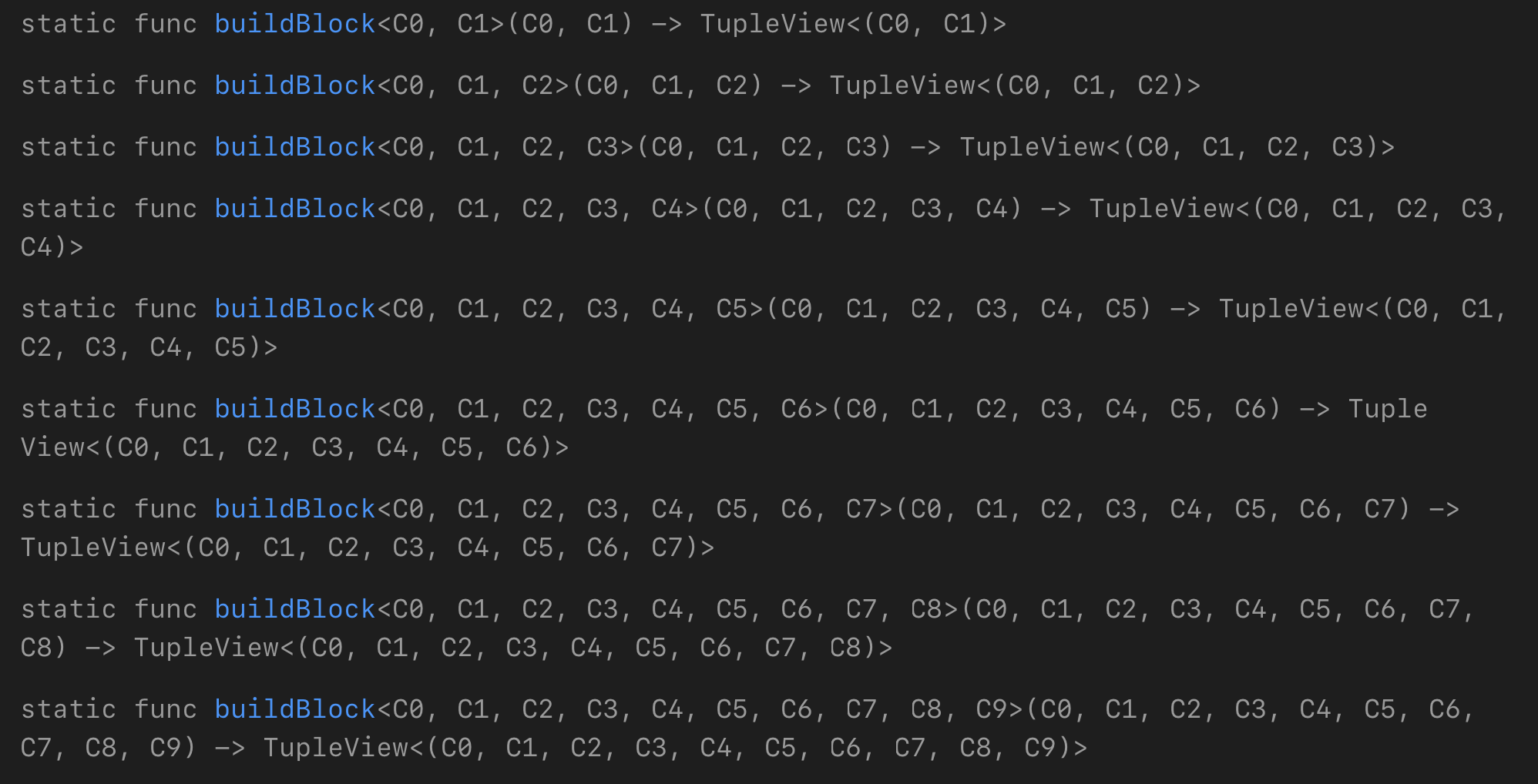
The processing of ViewBuilder.buildBlock that was previously declared as
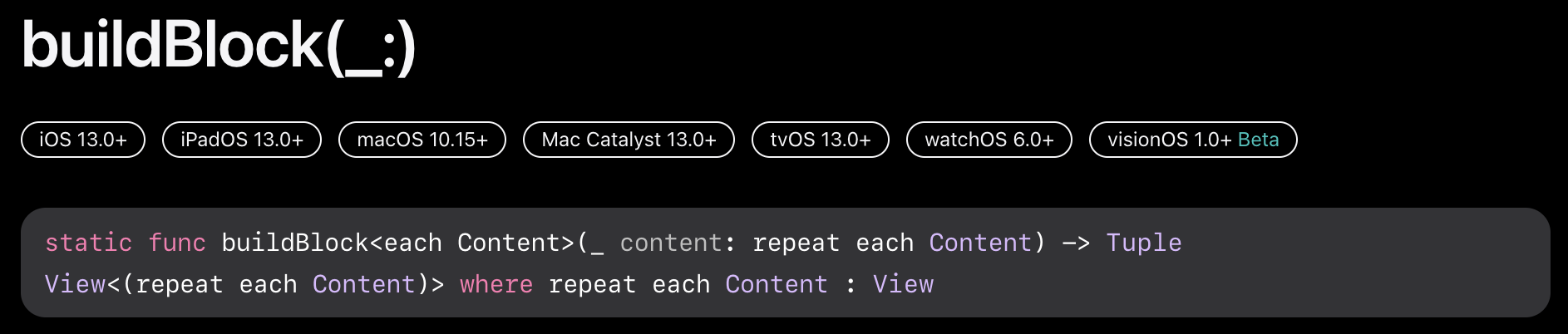
This was made possible because buildBlock(_:) was consolidated, thanks to the Value and Type Parameter Packs introduced in Swift 5.9.
Since this is not just a replacement with the common new APIs for iOS 17.0+, it can be used without worrying about the Deployment Target.
- Swift 5.9 (Xcode 15.0) 〜
- SE-0393 Value and Type Parameter Packs
- SE-0398 Allow Generic Types to Abstract Over Packs